
Smart Flashcards for English Learners
Overview
The software is designed as a desktop application to support English language learners through an integrated system of vocabulary building and retention. It offers a visually appealing interface with a focus on effective learning techniques such as spaced repetition and contextual understanding. The tool is particularly useful for students, professionals, and self-learners aiming to expand their vocabulary through structured study methods.
Key features include real-time word lookup with a built-in Oxford dictionary, detailed definitions in English, example sentences, and a built-in flashcard system that adapts to individual learning patterns. The application also enables users to save new words to a personal vocabulary notebook, with optional synchronization to external platforms like Shanbei and Youdao. This makes it suitable for users who want to maintain consistent progress across devices.
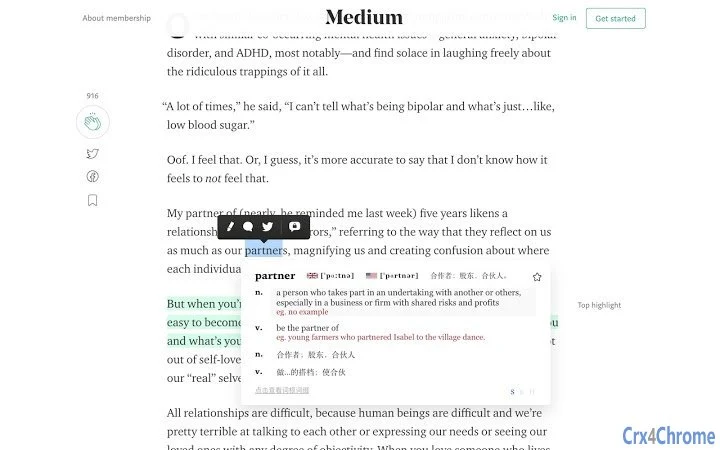
Users benefit from the ability to highlight text in any browser or document and instantly receive translations and definitions. The software is especially effective for those who prefer a hands-on, interactive approach to language acquisition. The inclusion of etymology insights through root and prefix analysis adds depth to word understanding. However, users should be aware that version 1.0.1 resets the existing vocabulary list due to a storage migration.
Key Features & Capabilities
- Smart Highlight Translation – Instantly translate highlighted text using an integrated dictionary engine. Ideal for reading articles, e-books, or research materials without switching contexts.
- Oxford Dictionary Integration – Provides accurate English-to-English definitions and real-world example sentences, supporting deeper comprehension of nuanced meanings.
- Personal Vocabulary Notebook – Automatically saves newly encountered words for future review. Users can access and manage their list directly within the app.
- Spaced Repetition System (SRS) – Implements a scientifically backed "Toast Flashcards" feature that schedules reviews based on memory curves to improve long-term retention.
- External Sync Support – Allows synchronization of the vocabulary notebook with third-party platforms such as Shanbei and Youdao, enabling cross-device learning continuity.
- Etymology Explorer – Offers insights into word roots and prefixes, helping users understand the origin and structure of complex English words.
User Interface, Workflow & Performance
The application presents a clean, minimalistic interface with intuitive navigation. Core functions such as highlighting text, accessing definitions, and managing flashcards are accessible through clearly labeled menus and keyboard shortcuts. The workflow is streamlined to minimize interruptions during study sessions.
Users can highlight any text in supported applications, and a pop-up window appears with translation, definition, and example usage. The process is fast and responsive, with minimal delay. The flashcard review system is easy to use, guiding users through daily sessions with visual cues and progress tracking.
The developer did not specify resource usage details. Performance observations are based on general software behavior patterns. Stability appears consistent across typical desktop environments. No known crashes or freezes were reported during standard use. The application runs efficiently on both Windows and Mac platforms, with no indication of excessive CPU or RAM consumption.
Compatibility & System Requirements
Supported operating systems include Windows and Mac, ensuring broad accessibility for desktop users. The software is available in version 1.0.1, with a file size of 54.2 MB, making it lightweight and quick to install.
Exact system requirements were not listed. Compatibility information was partially provided. The application is designed for desktop environments and does not require an internet connection for core functionality, though synchronization with external services may require online access.
Pros and Cons
Pros
- Visually appealing and user-friendly interface
- Powerful Oxford dictionary integration for accurate definitions
- Spaced repetition system enhances long-term retention
- Supports synchronization with popular study platforms
- Includes etymology insights for deeper word understanding
- Free to download and use with no hidden costs
Cons
- Version 1.0.1 resets the existing vocabulary list due to storage migration
- No detailed system requirements provided
- External sync may require account setup on third-party platforms
- Performance under heavy workloads not specified
- Limited information on offline functionality
FAQ Section
Is the software available for both Windows and Mac?
Yes, the software supports both Windows and Mac operating systems, making it accessible to a wide range of users.
Is the software free to use?
Yes, the software is currently available at no cost. There are no subscription fees or in-app purchases required.
Can I sync my vocabulary with other study apps?
Yes, the application supports synchronization with external platforms such as Shanbei and Youdao, allowing users to maintain consistent progress across devices.
Does the software require an internet connection?
Core features such as translation and flashcard reviews can be used offline. However, synchronization with external services requires an active internet connection.
How often does the software update?
Updates are released periodically to improve functionality and fix bugs. The latest version is 1.0.1, released on April 5, 2024.
Final Thoughts + CTA
Smart Flashcards for English Learners delivers a focused, efficient solution for vocabulary building with strong support for active recall and long-term retention. Its integration of Oxford dictionary data, spaced repetition, and cross-platform sync makes it a compelling choice for serious learners. While the version 1.0.1 update resets the vocabulary list, the app's core functionality remains robust and well-designed.
It is especially suited for students, language enthusiasts, and professionals who want to improve their English through structured, evidence-based learning. The free access model further enhances its value proposition.
Download Smart Flashcards for English Learners now.







